Mommy Pehpot

Top Mommy Blogger Philippines- Super Mommy; Award Winning Mommy Blogger

  • Home
  • About Me
  • Work With Me
  • Daily Vlog
  • Disclosure
  • Events

3 Times when Chat History Backup Saves You from Hell

I just finished our Frozen themed birthday party! To say I am exhausted is an understatement. I diyed 80% of the party.. cake, loot bags, decors and back drop. Nakakaloka!

That’s how busy I can get… and I have four kids, so imagine 4 parties every year, all diy-ed!

And though I am busy like that, I still try hard to be in contact with friends, get together, long chat and all. WeChat’s Chat History Backup makes my socializing better as it back ups the conversation that I want to remember.

Here’s what WeChat’s Chat History is all about (press release):

Chat Hist

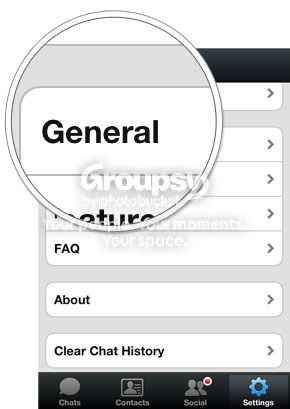
The simple 3-step process of WeChat’s Chat History Backup starts with selecting “Settings” > “General” > “Chat History Backup” and then clicking “Back Up” for the conversations you’d like to store.

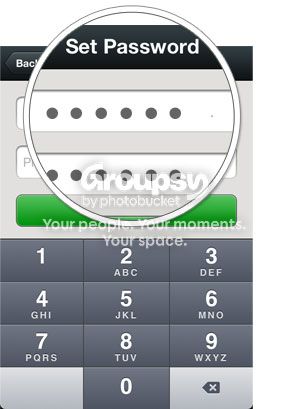
Once you’ve saved your chats, you can protect them by setting a password.

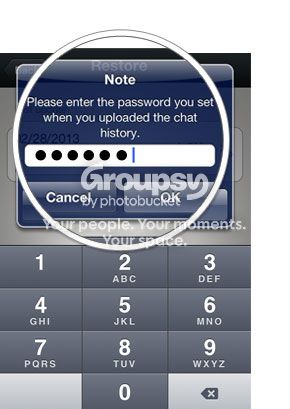
To restore your conversations on any device, simply log on and tap “Restore” on the Chat History Backup window. The backed-up history will be restored to your device from the server.


Below is a rundown of several instances when this cloud storage solution by WeChat saves your ass from encounters wherein you need to refer to your information while on-the-go.

  1. Retrieving important dates

Birthdays, anniversaries, or just about any date set for yearly celebrations are vital details easily forgotten by the human brain. Give your spatial memory an instant boost by referring to conversation histories, which may contain reminders of these occasions. Chats with your sister could reveal her listing hole-in-the wall restaurants like 100 Revolving Restaurant in Quiapo or El Chupacabra in inconspicuous Polaris Street in Makati. Also, conversations with your best friend could remind you of the annual Art in the Park exhibit at Salcedo Village, which you’ve planned to go to together.

  1. Keeping lists

If you observe daily routines, it’s easy to spot how digital messages have long replaced the function of tactile Post-its and refrigerator notes. Lacking several things in the pantry? Your mom could’ve sent you a grocery list via WeChat. Receiving a huge package with separate parts of a bike? One quick check of your history could bring up a message from your dad with DIY instructions—helping you you assemble your gear just in time for your mountaineering trip to the dirt trails of Montalban and Camp Aguinaldo.

  1. Retrieving work exchanges

Aside from notebooks and emails, digital conversations with colleagues have also been reference points for work-related tasks. Missed out on an important detail relayed to you by your teammate over your WeChat group? No problem. Simply retrieve your file either on your desktop, work phone, or personal phone and proceed to finishing your task.

 ——–

About WeChat

WeChat envisions and innovates new ways for people to connect, communicate and share. A mobile social communication app designed for smartphone users, WeChat is the world’s fastest growing social app with over 100 million registered accounts internationally.

WeChat empowers users in fun and dynamic ways by bringing together messaging, social communication and gaming in one seamless, interactive experience, with comprehensive privacy and security settings that can be tailored as needed.

WeChat is an all-in-one app that enables users to add friends with several innovative features. These include highly convenient and reliable QR code scanning, phonebook and location-based connection services such as “Hold Together”, “People Nearby” and “Shake.” The platform facilitates social interaction with real-time “Walkie Talkie,” “Voice Call,” and “Video Call.” Supported on data networks and Wi-Fi, WeChat makes it easy to stay connected with friends anywhere, anytime. Users can choose to communicate and share photos one-on-one, or within their closed social network through “Moments”. The popular WeChat Sticker Shop has a variety of fun animated emoticons to express any emotion.  Also, with a host of addictive WeChat Games, users can play and challenge their friends on the move, share scores and even find competitors nearby.

WeChat is available free for download on Android, BlackBerry, iOS, Symbian and Windows operating systems.

Learn more about WeChat and download the app at www.wechat.com

WeChat Philippines Facebook page: http://www.facebook.com/WeChatPH


17 Comments Filed Under: Featured

P&G Introduces Joy With A Touch Of Olay

Ito na mga mudra! Ang pinakamasaya, kwela at bonggang event na na attendan ko this year (kala mo naman ang dami ko ng napuntahang events this year haha). 

Don’t get me wrong OK, some of the events I attended this year was really great but what made this one the best so far is the experience I had during the event and of course the company that I was with. The event was the press launch of P&G’s newest product: Joy with a touch of Olay. The agency handling the product is one of my favorite PR agencies so I was really expecting that the event will be a fun one. What I didn’t know was, the event will also be attended by my mommy blogger friends..kaya ayan instant reunion! (salamat Moe and company!)

The bonggahan starts when I was invited to participate in the media challenge to help Mariel Rodriguez- Padilla do some tough household chores:

We opened cans using an old can opener (gaining the title Abrilata Queen LOL).. it was hard!! Nakalimutan ko na gumamit ng abrilata!! pero it was super fun.. I never thought Mariel can be that fun to work with.. ay walang kyeme ang babaeng ito. Game na game sa lahat ng ipagawa sa kanya! 

Imagine ha, while cutting veggies, nahiwa sya and then after that sige pa rin sa pagpiga ng citrus.. eh ang hapdi kaya nun!! Then to our station tapos hugas naman ng plato!! waaah After ng event na ito, fan na ako ni Mariel! 


She’s bubbly, she’s kind and super down to Earth.. after showing her hands to photographers and posing with P&G executives, she saw me and she asked me to join her for some photo ops! Mariel: Halika tayo naman

waaaaah nakaka flatter! Instant selfie with a celebrity

And what more? Mariel commented on our selfie photo..josme!!

Now, about the product:

“Joy with Olay strives to take care of women. It is formulated with Vitamin E, an antioxidant that helps repair the skin and nourishes the hands by locking in the skin’s moisture. Joy with Olay does not dry the hands, making them ‘touching moment’ ready,” – P&G Brand Communications Leader Anna Legarda

Sa mga magtatanong, Joy with Olay does not actually contain OLAY, it is the VItamin E that can be found in Olay..so wag kayo mag-alala na maglalasang Olay ang plato nyo, dahil hindi. 

Two reasons why I hate (yes strong word, and that’s exactly how I feel about dishwashing) washing the dishes are:

1. Whenever I wash the dishes, I always ended up cleaning the whole house. Maghuhugas ka, makikita mo ang dumi ng lababo..lilinisin mo, kaso magbabasa sa floor, pati floor lilinisin mo na din, hanggang buong bahay nalinis mo na!> ganyan ang istorya ng pag-uurong (tagalog term for hugas ng plato) ko.

2. It dries up my hands.

With this new product from P&G, mukhang mapapadalas ang paghuhugas ko ng plato! 

36 Comments Filed Under: House and Home

Blog Migration: How To Transfer Blogger Blog To WordPress

Now, I remember what is it that I hate with Blogger.. I started with that blogging platform… tried WordPress and bought my very first domain there (lesson learned> cheaper to buy domain at GoDaddy or any other domain registrar, rather than buy it at WP or Blogger). During those times, WP is a headache, so I decided to transfer my domain to GoDaddy (expensive!!) and so I got my own domain while using Blogger as my platform.

The reason why I decided to transfer to WordPress was when I accidentally deleted 300+ blog posts.. the Blogger dashboard is not friendly to mistakes. I was trying to delete my drafts and didn’t realized that I was on the published post area… clicked delete.. and BOOM!!! Blogger did not even asked me if I am sure to delete those files…. argh!!!! It would have been easier if I have a Database access.. which sadly, Blogger does not offer 🙁

Before transferring to WordPress, my blog is already huge.. er not huge like it has a lot followers.. huge in terms of size.. imagine 300+ blog posts (not to mention photos). We tried importing the contents of my Blogger blog using the IMPORT tool available at the WordPress dashboard. It didn’t worked. So, my dear friend created a free hosted WP blog (WordPress.com..ah! I know what will be my next post.. WordPress.com VS WordPress.org) then import the contents from the Blogger blog. After that, using my new WP blog, she imported that content from the free hosted WP blog.. so this is what happened when I transferred my blogger blog to WordPress:

Blogger>> WordPress.com > WordPress.org

Enough blah blah, here’s How To Transfer Blogger Blog To WordPress:

First Step (I will make a detailed blog post on this one too.. complete with photos)

  1. Log on to your Blogger dashboard and export your blog so you can have a back up, just in case everything went wrong. Dashboard>> Settings>> Other>> Blog Tools>> Export
  2. Convert your Blogger Blog to its blogspot address. Dashboard>> Basic>> Blog Address ( revert back to blogspot domain)
  3. Now log on to your domain registrar, to change the nameserver of your domain. Change it to the nameserver of your host.
  4. Log on to your host and add domain in your cpanel.
  5. Install a new wordpress on your cpanel, install it with a www prefix (since your blogger blog uses a www)
  6. After the WordPress is installed, you can now see your blog on WP platform.

Step 2: Migration/ Transfer Process:

  • After successfully installing a WordPress blog, log in to your dashboard (www.yourblog.com/wp-admin) 
  • Look for Blogger Importer plug in and install.
  • The Blogger importer is now located at tools:

  • Click import and click BLOGGER. Make sure that your Blogger account is logged in. Authorize the transfer and if you have many blogs under your blogger account, choose the blog that you want to import (then wait):

  • After importing your posts, comments and other contents, you might want to convert some of your tags into categories:  Import>> Categories and Tags Converter

  • Change the Permalink Structure, since Blogger blogs uses .html on their permalink where as WP does not.. To maintain this permalink all you need to do is change the structure. Go to permalink then go to Custom and put this:   /%year%/%monthnum%/%postname%.html  

    • Also install a PERMALINK PLUG IN for tying loose ends. as pointed out by Sam, WordPress automatically delete short words such as “the” “a” in the title name/ post name)


And you’re done! Now, explore WordPress and install plug ins, I will publish my TOP Must Install WordPress Plugins next week.

EDIT: While trying to import some of old posts (to come up with an updated import-export tutorial) I didn’t noticed that FB post plug in was on.. my friends’ news feed were flooded with posts from a long time ago, which includes Scott Kay jewelry designer blog post and other press release posts. I hope no one blocks for that 🙁

23 Comments Filed Under: BLOGGING, Tips and Tutorials Tagged With: Blog Migration: How To Transfer Blogger Blog To WordPress

  • « Previous Page
  • 1
  • …
  • 388
  • 389
  • 390
  • 391
  • 392
  • …
  • 1023
  • Next Page »
Mommy Blogger Pehpot

Search

Popular Posts

  • Smart Plan iPhone 17 Pro Max: No DP Renewal Experience
    Smart Plan iPhone 17 Pro Max: No DP Renewal Experience
  • Mga Pamahiin Sa Paglipat Ng Bahay
    Mga Pamahiin Sa Paglipat Ng Bahay
  • Nutrition Month Celebration and Costume Ideas
    Nutrition Month Celebration and Costume Ideas
  • Best Way To Order Petron Gasul
    Best Way To Order Petron Gasul
  • Social Media Influencers Philippines
    Social Media Influencers Philippines
  • Starbucks Harry Potter Philippines Price List
    Starbucks Harry Potter Philippines Price List
  • Effective Home Remedy For Almoranas (Hemorrhoids)
    Effective Home Remedy For Almoranas (Hemorrhoids)
  • Jollibee Party Package Outside Store
    Jollibee Party Package Outside Store
  • 3 Important Things You Need To Know About Primary Complex (and other treatment tips)
    3 Important Things You Need To Know About Primary Complex (and other treatment tips)
  • DOLE Working Child Permit Application
    DOLE Working Child Permit Application

Recent Posts

  • The Crafters Marketplace Crafting Event
  • Abi Marquez Launches Her Official Apron as Hedley & Bennett’s First Filipino Collaborator
  • Robinsons Department Store Back To School Promo
  • Waffles with Chicken Strips Meryenda For Kids
  • Top 5 Reasons Why You Must Watch Jesus Christ Superstar
  • Cheesy Chicken Katsu Recipe Kids Will Love
  • 10 FAQs Before Watching Jesus Christ Superstar Manila
  • Jesus Christ Superstar Merchandise and Prices
  • Civago Water Bottle Review for Daily Hydration
  • Solaire Promo: Free Jesus Christ Superstar Tickets

Home and Living

Waffles with Chicken Strips Meryenda For Kids

Cheesy Chicken Katsu Recipe Kids Will Love

Ham and Cheese Sandwich Recipe

Blog Buzz & Media Updates

Abi Marquez Launches Her Official Apron as Hedley & Bennett’s First Filipino Collaborator

Robinsons Department Store Back To School Promo

Solaire Promo: Free Jesus Christ Superstar Tickets

Get more mommy stories and parenting tips straight to your inbox:

Useful Links

  • Kids
  • Home & Living
  • Parenting
  • Personally Pehpot

PSA Birth Certificate Delivery Service

PSA Birth Certificate Delivery Service

SEARCH MY WEBSITE

· Copyright © 2026. Site brewed with love by Squeesome Design Studio ·