If you’re into paid posting.. by now you’ve realize how stupid you are to accept a $5 link and then you’ll be asked to remove that link! Argh! Double the trouble! Take a deep breathe and remove that link ASAP! Link removals will do good on your blog! You’ll get rid of that cheap link and less stress dealing with the companies requesting for such. These companies tend to harass bloggers who won’t comply with their link removal request (it’s a request, dammit). I heard a blogger who got a demand letter and another one who was threatened that they will sabotage their hosting.. nyeee!
Link removal is easy.. the thing is, if you have more than 10 blogs and like more than 500 posts per blog, granted only half are paid post.. that’s 2500 blog posts!!! Who has time to manually remove links from that much blog posts? Certainly not you!
I have been searching for the bets plugin to use to remove links.. so far I only got a NO Follow plugin>>> Read everything about this plugin HERE as well as the difference of Do Follow and No Follow link.
A friend asked what’s the difference of Link Removal and No Follow Links..

- Link Removal means removing the link, the text link will appear just like ordinary text.
- No Follow link means the link is still there but the attribute is no follow.
In the world of SEO, a no follow link is almost the same as no link at all.
The latest plug in I found is called Outbound Link Manager.. before finding that plug in, Sir Ed Joven of Tech News PH mentioned the use of Broken Link Checker plugin to remove links.
It’s a nice plugin to check your blog for broken links and yes it can also remove links but it can be time consuming and the parameters I need is not offered on this plugin (like, what if I only need to erase links from a certain category or month).
So I found Outbound Link Manager Plugin!
Although this plugin hasn’t been updated for over two years, I still find it useful. Install and activate the plugin and start deleting links!
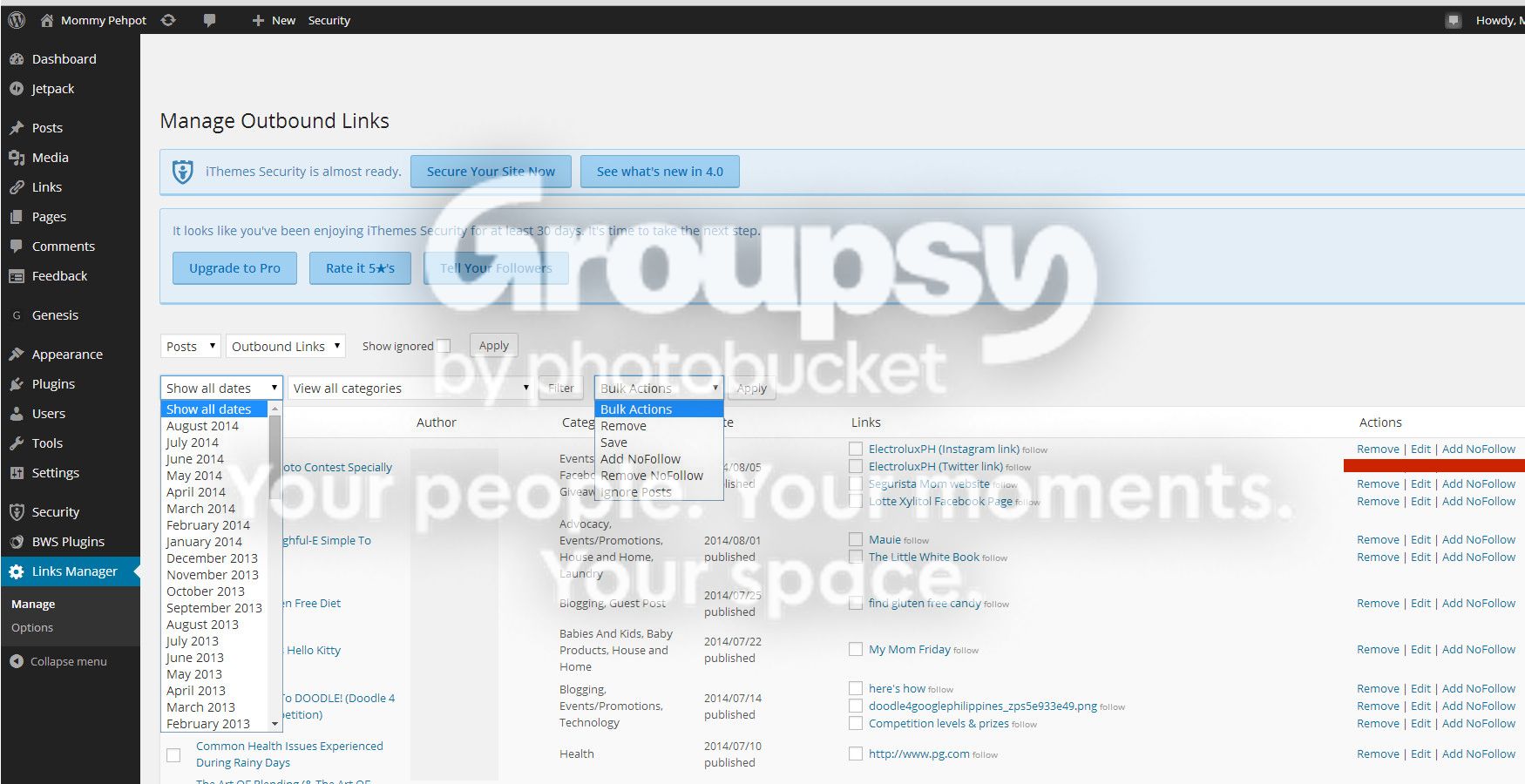
See what I mean?
You can delete links based on category.. so if you have a category for all your paid post, good for you!! this is the best plugin for you!!!!
But if you don’t label your paid post, the safest to do is delete all links from a year ago then make all the succeeding link a no follow link. Assuming that all paid links expire in a year, deleting them won’t affect your clients.
For links less than a year old, if your client complains for the no follow attribute, just remove it.
So far, this is serving its purposes, if only:
- I have an option to display more than 10 links
- I don’t have to click the “APPLY” button every time I need to go to a certain date or category
- The plug in does not bring me back to page 1 (of the link list) every time I delete links from the last page. (HASSLE!)
I am trying this plugin with my other blogs.. deleting links is quite tedious than just adding a site wide no follow attribute, but it is worth it.
How about you? What link manager plugins have you tried? Please do let me know if Outbound Link Manager Plugin works for you too.
GOOD LUCK!









Leave a Reply