Mommy Pehpot

Top Mommy Blogger Philippines- Super Mommy; Award Winning Mommy Blogger

  • Home
  • About Me
  • Work With Me
  • Daily Vlog
  • Disclosure
  • Events

3 Times when Chat History Backup Saves You from Hell

I just finished our Frozen themed birthday party! To say I am exhausted is an understatement. I diyed 80% of the party.. cake, loot bags, decors and back drop. Nakakaloka!

That’s how busy I can get… and I have four kids, so imagine 4 parties every year, all diy-ed!

And though I am busy like that, I still try hard to be in contact with friends, get together, long chat and all. WeChat’s Chat History Backup makes my socializing better as it back ups the conversation that I want to remember.

Here’s what WeChat’s Chat History is all about (press release):

Chat Hist

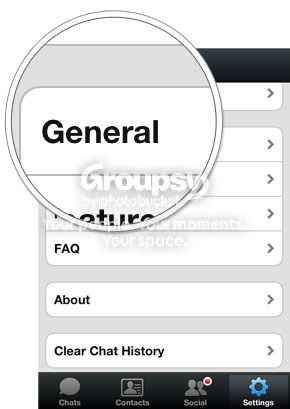
The simple 3-step process of WeChat’s Chat History Backup starts with selecting “Settings” > “General” > “Chat History Backup” and then clicking “Back Up” for the conversations you’d like to store.
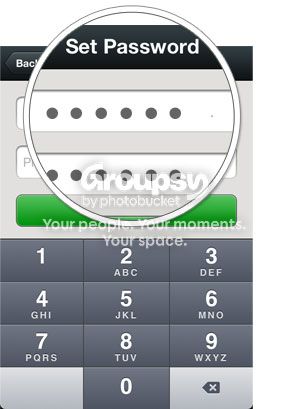
Once you’ve saved your chats, you can protect them by setting a password.

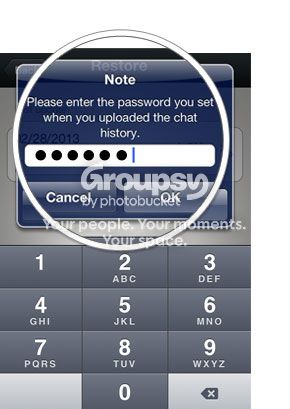
To restore your conversations on any device, simply log on and tap “Restore” on the Chat History Backup window. The backed-up history will be restored to your device from the server.


Below is a rundown of several instances when this cloud storage solution by WeChat saves your ass from encounters wherein you need to refer to your information while on-the-go.

  1. Retrieving important dates

Birthdays, anniversaries, or just about any date set for yearly celebrations are vital details easily forgotten by the human brain. Give your spatial memory an instant boost by referring to conversation histories, which may contain reminders of these occasions. Chats with your sister could reveal her listing hole-in-the wall restaurants like 100 Revolving Restaurant in Quiapo or El Chupacabra in inconspicuous Polaris Street in Makati. Also, conversations with your best friend could remind you of the annual Art in the Park exhibit at Salcedo Village, which you’ve planned to go to together.

  1. Keeping lists

If you observe daily routines, it’s easy to spot how digital messages have long replaced the function of tactile Post-its and refrigerator notes. Lacking several things in the pantry? Your mom could’ve sent you a grocery list via WeChat. Receiving a huge package with separate parts of a bike? One quick check of your history could bring up a message from your dad with DIY instructions—helping you you assemble your gear just in time for your mountaineering trip to the dirt trails of Montalban and Camp Aguinaldo.

  1. Retrieving work exchanges

Aside from notebooks and emails, digital conversations with colleagues have also been reference points for work-related tasks. Missed out on an important detail relayed to you by your teammate over your WeChat group? No problem. Simply retrieve your file either on your desktop, work phone, or personal phone and proceed to finishing your task.

 ——–

About WeChat

WeChat envisions and innovates new ways for people to connect, communicate and share. A mobile social communication app designed for smartphone users, WeChat is the world’s fastest growing social app with over 100 million registered accounts internationally.

WeChat empowers users in fun and dynamic ways by bringing together messaging, social communication and gaming in one seamless, interactive experience, with comprehensive privacy and security settings that can be tailored as needed.

WeChat is an all-in-one app that enables users to add friends with several innovative features. These include highly convenient and reliable QR code scanning, phonebook and location-based connection services such as “Hold Together”, “People Nearby” and “Shake.” The platform facilitates social interaction with real-time “Walkie Talkie,” “Voice Call,” and “Video Call.” Supported on data networks and Wi-Fi, WeChat makes it easy to stay connected with friends anywhere, anytime. Users can choose to communicate and share photos one-on-one, or within their closed social network through “Moments”. The popular WeChat Sticker Shop has a variety of fun animated emoticons to express any emotion.  Also, with a host of addictive WeChat Games, users can play and challenge their friends on the move, share scores and even find competitors nearby.

WeChat is available free for download on Android, BlackBerry, iOS, Symbian and Windows operating systems.

Learn more about WeChat and download the app at www.wechat.com

WeChat Philippines Facebook page: http://www.facebook.com/WeChatPH


17 Comments Filed Under: Featured

Mommy Pehpot’s Easy Bread Breakfast Giveaway

As promised.. here it is!!!

Good luck Guys!!!

a Rafflecopter giveaway

I can’t wait to read your comments 🙂

241 Comments Filed Under: Featured

WeChat 5.2: Taking Up the Ante for Social Scenes with 6 New Features

WeChat’s 5.2 upgrade for Android and iOS makes my socializing a lot easier and more fun. With the 6 features added, finding my friends and interacting with them is a breeze!

Convenience is the keyword with WeChat’s new MENU BAR. An OCD approved menu bar with 3 main components: Chats, Discover and Contacts. Chats lets me continue with my current conversation, Discover takes me to my favorite features such as Games, Moments, Scan QR Code, Shake, People Nearby, Drift Bottle, Games, and Sticker Shop. Contacts give me quick access to my friends.


And here’s my favorite among the six: FRIEND RADAR

Hindi ba ang saya kung bigla mo na lang makikita ang friend mo sa isang lugar? Like last week, I saw Tina at Taal Vista (instant meet up! Haha) Imagined if your friend is on the same place pero hindi kayo nagkita? Nakakahinayang di ba? Now, with WeChat’s Friend Radar feature can automatically identify other users within the vicinity and give you the option to add them to your contact list with one tap of their images.

How to access Friend Radar?


Here’s another one that I like from the new 6 features added: REAL-TIME LOCATION-SHARING

This is very helpful when you are planning a meet up, a shopping trip or bazaar hopping with your friends. Coordinate your location and the place where you will meet, you can also invite your friends to share where they are and help them navigate their way on the WeChat map and through an integrated walkie-talkie session. Simply open a chat > + > Locations > Real-time Location > to view one another’s maps.

GROUP CHAT PHOTO ALBUM

You can share your barkada photos on your group chat and easily access it through one tap of the Photo Album icon.

WeChat’s 5.2 Group Chat Photo Album, photos shared in your group chat—whether for skating trips in the metro or diving sessions at Palawan—are arranged by date and then stored in one location

UNIVERSAL SEARCH

With WeChat’s Universal Search feature is very helpful, especially for people like me! With so many things going on, anything that will make my life easier is a welcome treat. I don’t need to scroll all the chats I had just to look for something that I forgot, all I need is to use this feature.

The last but not the least, CONTACT LIST CUSTOMIZATION, WeChat’s 5.2 feature that lets you manage your network.

This feature gives you the option to add photos, addresses and business cards to your friends’ profiles.

Apart from these updates, WeChat 5.2 for Android also comes with enhanced versions of its staple features.

  • Group Chat Mention Notifications
  • LinkedIn Account in WeChat
  • More animated stickers at Sticker Shop

All of this, complemented with the new, easy-to-use interface means more possibilities for your social life. To upgrade now and for the latest updates, visit www.wechat.com.

###

About WeChat

WeChat envisions and innovates new ways for people to connect, communicate and share. A mobile social communication app designed for smartphone users, WeChat is the world’s fastest growing social app with over 100 million registered accounts internationally.

WeChat empowers users in fun and dynamic ways by bringing together messaging, social communication and gaming in one seamless, interactive experience, with comprehensive privacy and security settings that can be tailored as needed.

WeChat is an all-in-one app that enables users to add friends with several innovative features. These include highly convenient and reliable QR code scanning, phonebook and location-based connection services such as “Hold Together”, “People Nearby” and “Shake.” The platform facilitates social interaction with real-time “Walkie Talkie,” “Voice Call,” and “Video Call.” Supported on data networks and Wi-Fi, WeChat makes it easy to stay connected with friends anywhere, anytime. Users can choose to communicate and share photos one-on-one, or within their closed social network through “Moments”. The popular WeChat Sticker Shop has a variety of fun animated emoticons to express any emotion. Also, with a host of addictive WeChat Games, users can play and challenge their friends on the move, share scores and even find competitors nearby.

WeChat is available free for download on Android, BlackBerry, iOS, Symbian and Windows operating systems.

Learn more about WeChat and download the app at www.wechat.com

WeChat Philippines Facebook page: http://www.facebook.com/WeChatPH

18 Comments Filed Under: Featured

  • « Previous Page
  • 1
  • …
  • 32
  • 33
  • 34
  • 35
  • 36
  • …
  • 233
  • Next Page »
Mommy Blogger Pehpot

Search

Popular Posts

  • 3 Important Things You Need To Know About Primary Complex (and other treatment tips)
    3 Important Things You Need To Know About Primary Complex (and other treatment tips)
  • Mga Pamahiin Sa Paglipat Ng Bahay
    Mga Pamahiin Sa Paglipat Ng Bahay
  • Les Miserables Manila 2026: World Tour Spectacular
    Les Miserables Manila 2026: World Tour Spectacular
  • Dehumidifier Philippines Where to Buy
    Dehumidifier Philippines Where to Buy
  • Just in Time
    Just in Time
  • Astoria Raffle Winners
    Astoria Raffle Winners
  • Jollibee Party Package 2018 Updated Price List
    Jollibee Party Package 2018 Updated Price List
  • Price of Aluminum Screen Door in the Philippines
    Price of Aluminum Screen Door in the Philippines
  • Essential Home Gardening Tips this 2020
    Essential Home Gardening Tips this 2020
  • Busy Friday
    Busy Friday

Recent Posts

  • Jesus Christ Superstar Manila Cast
  • Honor Online Exclusive Sale
  • OPPO’s Festive Service Center Rewards
  • Serving Warmth to Women in Need
  • Baguio Hotel Near Burnham
  • AS Watson Plastics Reduction Efforts
  • Dangwa Flowers Valentines 2026
  • TCL Renews Kathryn Bernardo for Year 4
  • Jesus Christ Superstar Manila Ticket Price
  • UNIQLO’s 2026 Spring/Summer Collection

Home and Living

Where to Buy SharkNinja Philippines

SM Home Christmas Decors

Baguio DIY Hotpot At Tudor In The Pines

Blog Buzz & Media Updates

Jesus Christ Superstar Manila Cast

OPPO’s Festive Service Center Rewards

Serving Warmth to Women in Need

Get more mommy stories and parenting tips straight to your inbox:

Useful Links

  • Kids
  • Home & Living
  • Parenting
  • Personally Pehpot

PSA Birth Certificate Delivery Service

PSA Birth Certificate Delivery Service

SEARCH MY WEBSITE

· Copyright © 2026. Site brewed with love by Squeesome Design Studio ·